

/parse — or point /scrape
at a public document URL — and get back markdown, per-page content, typed
layout blocks, or structured JSON.
- Layout-aware: headings, paragraphs, tables, and formulas assembled in reading order
- Scans included: native text extraction with OCR fallback for image-only pages
- Grounded structure: typed layout blocks with bounding boxes and character-span links into the markdown (PDFs)
- Any common format: PDF, Word, Excel, PowerPoint, OpenDocument, EPUB, CSV, HTML
- Zero Data Retention support
Quickstart
Have a public document URL instead of a file?
/scrape
detects the file type and parses it identically — same options, same output:
firecrawl.scrape("https://example.com/report.pdf").Response
SDKs return the document object directly. cURL returns the JSON payload.numPages is the number of pages actually parsed; totalPages is the document’s
true page count. They match unless maxPages truncated the result — e.g. parsing
a 100-page PDF with maxPages: 10 returns numPages: 10 and totalPages: 100, so
totalPages > numPages tells you the output was truncated. totalPages is omitted
when the page count can’t be determined.Per-page markdown (PDF)
Setpages: true on the PDF parser and the document also
carries a pages array with the physical per-page markdown — useful when you
need to know which page content came from, or to process pages independently.
No additional cost.
Page markers (PDF)
SetpageMarkers: true on the PDF parser and pages in the
document markdown itself are joined with an HTML-comment marker naming the
physical page that follows:
<!-- page N -->, 1-based). No additional cost.
Markers appear between pages only — there is no leading marker for page 1.
Numbering may skip a page when the parser merges content across a page break
(a table or sentence continuing onto the next page leaves no boundary to
mark). Use
pages: true when you need every
physical page separately; the two options compose.Layout blocks (PDF)
Setblocks: true on the PDF parser and the document also
carries a blocks array: for every page, the typed layout blocks the parsing
engine detected, with geometry and provenance. This is the structured
counterpart to the markdown — use it for citation grounding, highlight
overlays, or auditing what a document contains. No additional cost.
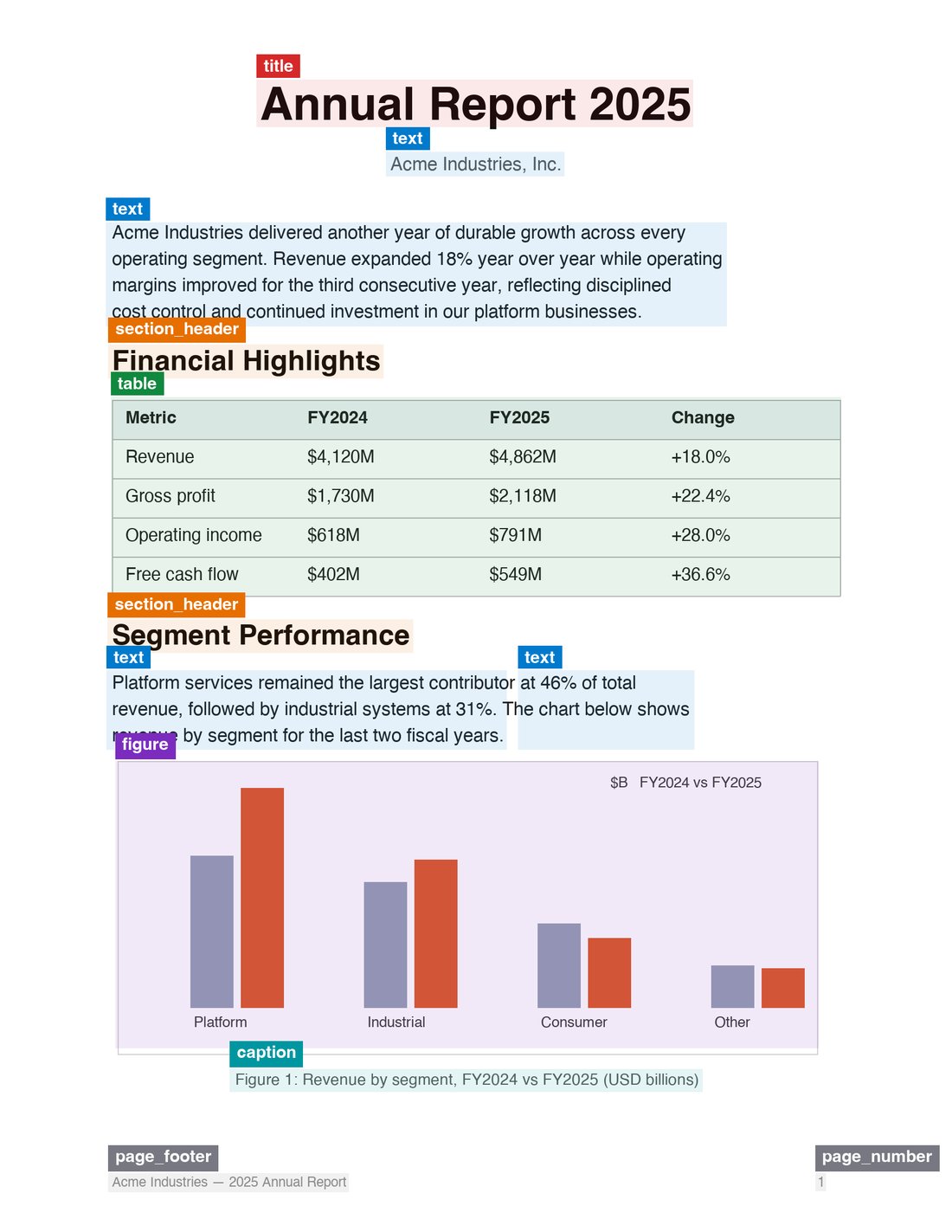
Every block the engine detects, typed and positioned — the same regions that become the markdown.
Block fields
Grounding: from an answer back to the page
markdownSpan links every block to the exact substring of the markdown it
produced. That makes citation grounding a lookup, not an inference: find the
quoted text in the markdown, find the block whose span covers that offset,
and you have the page number and bounding box — without ever asking a
language model for coordinates.
Structured JSON output
Pass a JSON schema or prompt to extract structured data directly from the document:PDF options
All PDF behavior is controlled through theparsers option — on /parse and
/scrape alike:
Passing
parsers: [] skips parsing entirely and returns the PDF as base64
(1 credit flat).
Parsing modes
Supported formats
Extensions:.html, .htm, .xhtml, .pdf, .docx, .doc, .docm, .odt, .ods, .odp, .rtf, .xlsx, .xls, .xlsm, .xlsb, .pptx, .ppt, .pptm, .epub, .csv.
To read the list programmatically, with MIME types, call
GET /v2/parse/formats.
See Document Parsing for how each format is
converted.
Request reference
The request ismultipart/form-data with a required file part and an
optional options JSON part. options accepts a subset of scrape options:
formats: Array of output formats. Defaults to["markdown"]. Supported:markdown,html,rawHtml,links,images,summary, andjson(with a schema or prompt).onlyMainContent: Only return the main content of the document. Defaults totrue.includeTags/excludeTags: Tag-level inclusion or exclusion (HTML inputs).redactPII: Redact personally identifiable information from returned markdown.timeout: Request timeout in milliseconds. Defaults to30000, max300000.parsers: File-parser controls — see PDF options.
/parse does not support browser-only options like actions, waitFor, location, mobile, or change tracking.Considerations
- Maximum file size is 50 MB per request.
- PDF parsing is billed at 1 credit per page; the
pages,blocks, andpageMarkersoptions add no cost. - Parsing very large or scanned PDFs in
ocrmode may take longer — increasetimeoutor usemaxPagesto bound the work. - For batches of files, call
/parseper file in parallel; there is no batch upload variant.
Are you an AI agent that needs a Firecrawl API key? See firecrawl.dev/agent-onboarding/SKILL.md for automated onboarding instructions.