> ## Documentation Index
> Fetch the complete documentation index at: https://docs.firecrawl.dev/llms.txt
> Use this file to discover all available pages before exploring further.
# Firecrawl を使ったブランドスタイルガイドジェネレーターの構築
> Firecrawl の branding format を使って任意のウェブサイトからデザインシステムを抽出し、プロフェッショナルな PDF ブランドスタイルガイドを生成する
任意のウェブサイトから色、タイポグラフィ、余白(スペーシング)、ビジュアルアイデンティティを自動で抽出し、それらをプロフェッショナルな PDF ドキュメントとしてまとめるブランドスタイルガイドジェネレーターを構築します。
## このガイドで構築するもの
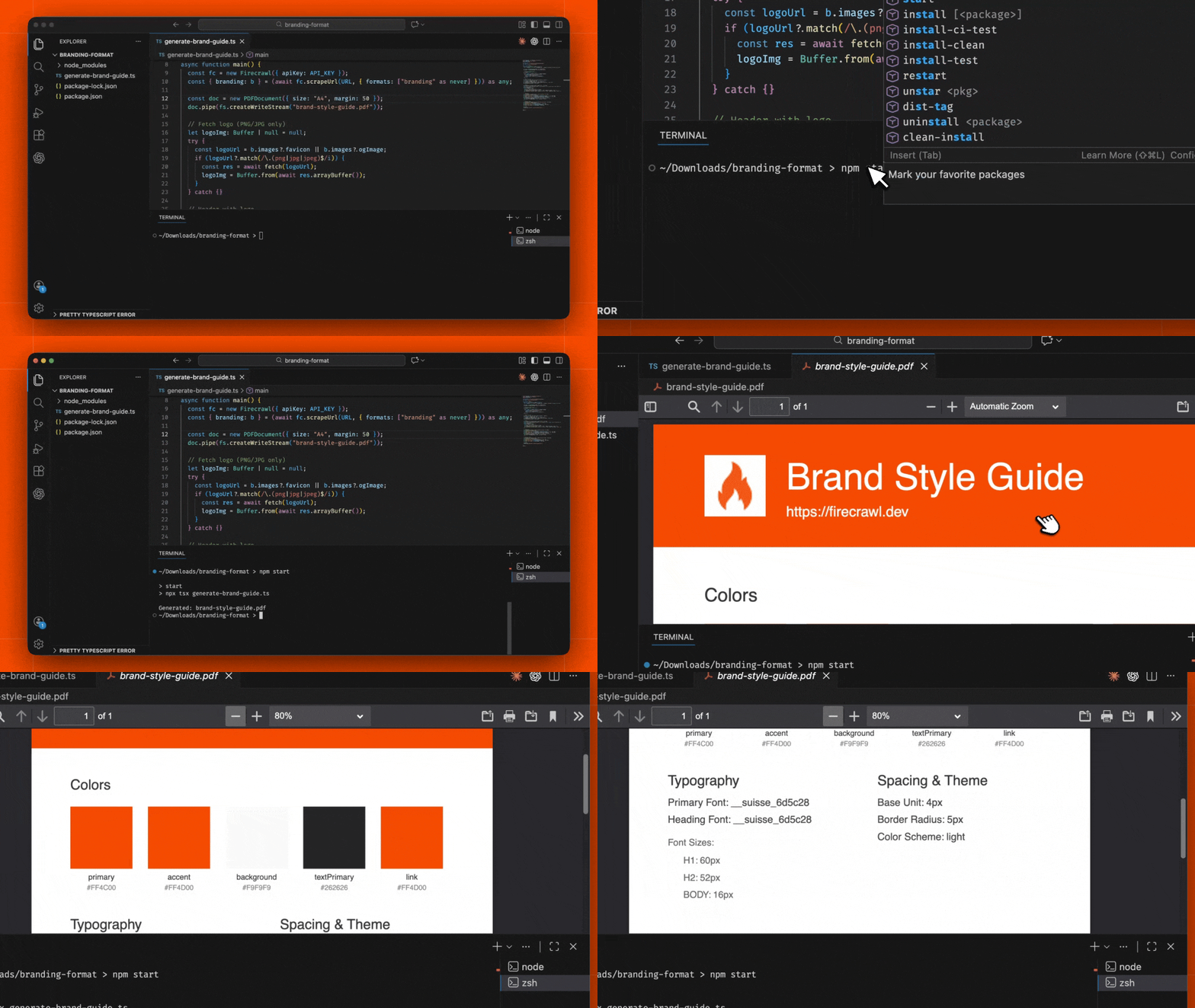
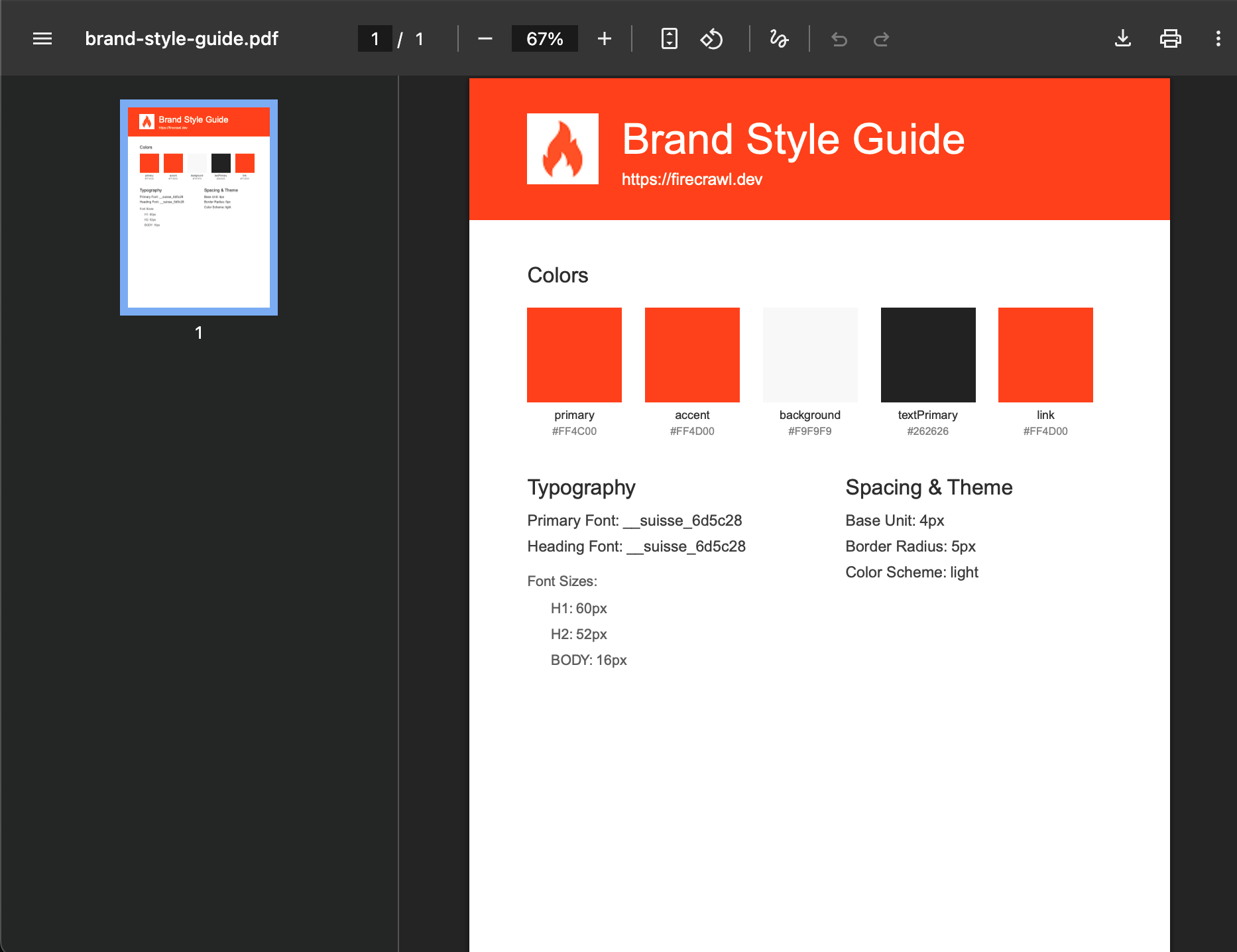
任意のウェブサイトの URL を入力として受け取り、Firecrawl の branding format を使ってブランドアイデンティティを完全に抽出し、次の内容を含む洗練された PDF スタイルガイドを生成する Node.js アプリケーションです:
* HEX 値付きのカラーパレット
* タイポグラフィシステム(フォント、サイズ、ウェイト)
* スペーシングとレイアウトの仕様
* ロゴおよびブランド画像
* テーマ情報(ライト / ダークモード)
## 前提条件
* Node.js 18 以降がインストールされていること
* [firecrawl.dev](https://firecrawl.dev) から取得した Firecrawl API キー
* TypeScript と Node.js の基礎知識
まず、プロジェクト用の新しいディレクトリを作成し、プロジェクトを初期化します:
```bash theme={null}
mkdir brand-style-guide-generator && cd brand-style-guide-generator
npm init -y
```
`package.json` を更新し、ES モジュールを利用するようにします:
```json package.json theme={null}
{
"name": "brand-style-guide-generator",
"version": "1.0.0",
"type": "module",
"scripts": {
"start": "npx tsx index.ts"
}
}
```
WebスクレイピングとPDF生成に必要なパッケージをインストールします。
```bash theme={null}
npm i firecrawl pdfkit
npm i -D typescript tsx @types/node @types/pdfkit
```
これらのパッケージは次の機能を提供します:
* `firecrawl`: ウェブサイトからブランドアイデンティティを抽出するための Firecrawl SDK
* `pdfkit`: PDF ドキュメント生成ライブラリ
* `tsx`: Node.js 向けの TypeScript 実行環境
メインのアプリケーションファイル `index.ts` を作成します。このスクリプトは、URL からブランドアイデンティティを抽出し、プロフェッショナルな PDF 形式のスタイルガイドを生成します。
```typescript index.ts theme={null}
import { Firecrawl } from "firecrawl";
import PDFDocument from "pdfkit";
import fs from "fs";
const API_KEY = "fc-YOUR-API-KEY";
const URL = "https://firecrawl.dev";
async function main() {
const fc = new Firecrawl({ apiKey: API_KEY });
const { branding: b } = (await fc.scrape(URL, { formats: ["branding"] })) as any;
const doc = new PDFDocument({ size: "A4", margin: 50 });
doc.pipe(fs.createWriteStream("brand-style-guide.pdf"));
// ロゴを取得(PNG/JPGのみ)
let logoImg: Buffer | null = null;
try {
const logoUrl = b.images?.favicon || b.images?.ogImage;
if (logoUrl?.match(/\.(png|jpg|jpeg)$/i)) {
const res = await fetch(logoUrl);
logoImg = Buffer.from(await res.arrayBuffer());
}
} catch {}
// ロゴ付きヘッダー
doc.rect(0, 0, 595, 120).fill(b.colors?.primary || "#333");
const titleX = logoImg ? 130 : 50;
if (logoImg) doc.image(logoImg, 50, 30, { height: 60 });
doc.fontSize(36).fillColor("#fff").text("Brand Style Guide", titleX, 38);
doc.fontSize(14).text(URL, titleX, 80);
// カラー
doc.fontSize(18).fillColor("#333").text("Colors", 50, 160);
const colors = Object.entries(b.colors || {}).filter(([, v]) => typeof v === "string" && (v as string).startsWith("#"));
colors.forEach(([k, v], i) => {
const x = 50 + i * 100;
doc.rect(x, 195, 80, 80).fill(v as string);
doc.fontSize(10).fillColor("#333").text(k, x, 282, { width: 80, align: "center" });
doc.fontSize(9).fillColor("#888").text(v as string, x, 296, { width: 80, align: "center" });
});
// タイポグラフィ
doc.fontSize(18).fillColor("#333").text("Typography", 50, 340);
doc.fontSize(13).fillColor("#444");
doc.text(`Primary Font: ${b.typography?.fontFamilies?.primary || "—"}`, 50, 370);
doc.text(`Heading Font: ${b.typography?.fontFamilies?.heading || "—"}`, 50, 392);
doc.fontSize(12).fillColor("#666").text("Font Sizes:", 50, 422);
Object.entries(b.typography?.fontSizes || {}).forEach(([k, v], i) => {
doc.text(`${k.toUpperCase()}: ${v}`, 70, 445 + i * 22);
});
// スペーシングとテーマ
doc.fontSize(18).fillColor("#333").text("Spacing & Theme", 320, 340);
doc.fontSize(13).fillColor("#444");
doc.text(`Base Unit: ${b.spacing?.baseUnit}px`, 320, 370);
doc.text(`Border Radius: ${b.spacing?.borderRadius}`, 320, 392);
doc.text(`Color Scheme: ${b.colorScheme}`, 320, 414);
doc.end();
console.log("Generated: brand-style-guide.pdf");
}
main();
```
このシンプルなプロジェクトでは、API キーをコード内に直接記述しています。GitHub にプッシュしたり他者と共有したりする予定がある場合は、キーを `.env` ファイルに移し、代わりに `process.env.FIRECRAWL_API_KEY` を使用してください。
`fc-YOUR-API-KEY` を、[firecrawl.dev](https://firecrawl.dev) から取得した Firecrawl の API キーに置き換えてください。
### コードの解説
**主要コンポーネント:**
* **Firecrawl Branding Format**: `branding` フォーマットは、色、タイポグラフィ、余白、画像などを含む包括的なブランドアイデンティティを抽出します
* **PDFKit Document**: 適切なマージンとセクションを備えたプロフェッショナルな A4 PDF を生成します
* **Color Swatches**: 16 進数表記の値と意味のある名前付きで色ブロックを視覚的に表示します
* **Typography Display**: フォントファミリーとサイズを整理されたレイアウトで表示します
* **Spacing & Theme**: デザインシステムのスペーシング (余白) 単位とカラースキームを文書化します
次のスクリプトを実行してブランドスタイルガイドを生成します:
```bash theme={null}
npm start
```
このスクリプトは次の処理を行います:
1. Firecrawl のブランディングフォーマットを使用して、対象 URL からブランドアイデンティティを抽出する
2. `brand-style-guide.pdf` という名前の PDF を生成する
3. それをプロジェクトディレクトリに保存する
別の Web サイト向けのスタイルガイドを生成するには、`index.ts` 内の `URL` 定数を変更するだけです。
## 動作の仕組み
1. **URL 入力**: ジェネレーターが対象サイトの URL を受け取る
2. **Firecrawl スクレイピング**: `branding` フォーマットを指定して `/scrape` エンドポイントを呼び出す
3. **ブランド分析**: Firecrawl がページの CSS、フォント、ビジュアル要素を解析する
4. **データ返却**: すべてのデザイントークンを構造化された `BrandingProfile` オブジェクトとして返す
### PDF 生成プロセス
1. **ヘッダー作成**: ブランドのプライマリカラーを使ってカラーのヘッダーを生成します
2. **ロゴ取得**: 利用可能な場合はロゴまたはファビコンをダウンロードして埋め込みます
3. **カラーパレット**: 各色をメタデータ付きの色見本としてレンダリングします
4. **タイポグラフィセクション**: フォントファミリー、サイズ、ウェイトを記載します
5. **スペーシング情報**: ベースユニット、ボーダー半径、テーマモードを含みます
### ブランディングプロファイルの構造
[branding format](https://docs.firecrawl.dev/features/scrape#%2Fscrape-with-branding-endpoint) では、ブランドに関する詳細な情報が返されます。
```typescript theme={null}
{
colorScheme: "dark" | "light",
logo: "https://example.com/logo.svg",
colors: {
primary: "#FF6B35",
secondary: "#004E89",
accent: "#F77F00",
background: "#1A1A1A",
textPrimary: "#FFFFFF",
textSecondary: "#B0B0B0"
},
typography: {
fontFamilies: { primary: "Inter", heading: "Inter", code: "Roboto Mono" },
fontSizes: { h1: "48px", h2: "36px", body: "16px" },
fontWeights: { regular: 400, medium: 500, bold: 700 }
},
spacing: {
baseUnit: 8,
borderRadius: "8px"
},
images: {
logo: "https://example.com/logo.svg",
favicon: "https://example.com/favicon.ico"
}
}
```
## 主な機能
ジェネレーターはすべてのブランドカラーを検出し、カテゴリ分けします:
* **Primary & Secondary**: メインのブランドカラー
* **Accent**: ハイライトやCTA用のアクセントカラー
* **Background & Text**: UIの土台となる背景・テキストカラー
* **Semantic Colors**: 成功・警告・エラーなどの状態を表すカラー
### タイポグラフィドキュメント
タイポグラフィシステム全体を網羅しています:
* **Font Families**: 基本、見出し、等幅フォント
* **Size Scale**: すべての見出しと本文テキストのサイズ
* **Font Weights**: 利用可能なウェイト(太さ)のバリエーション
### ビジュアル出力
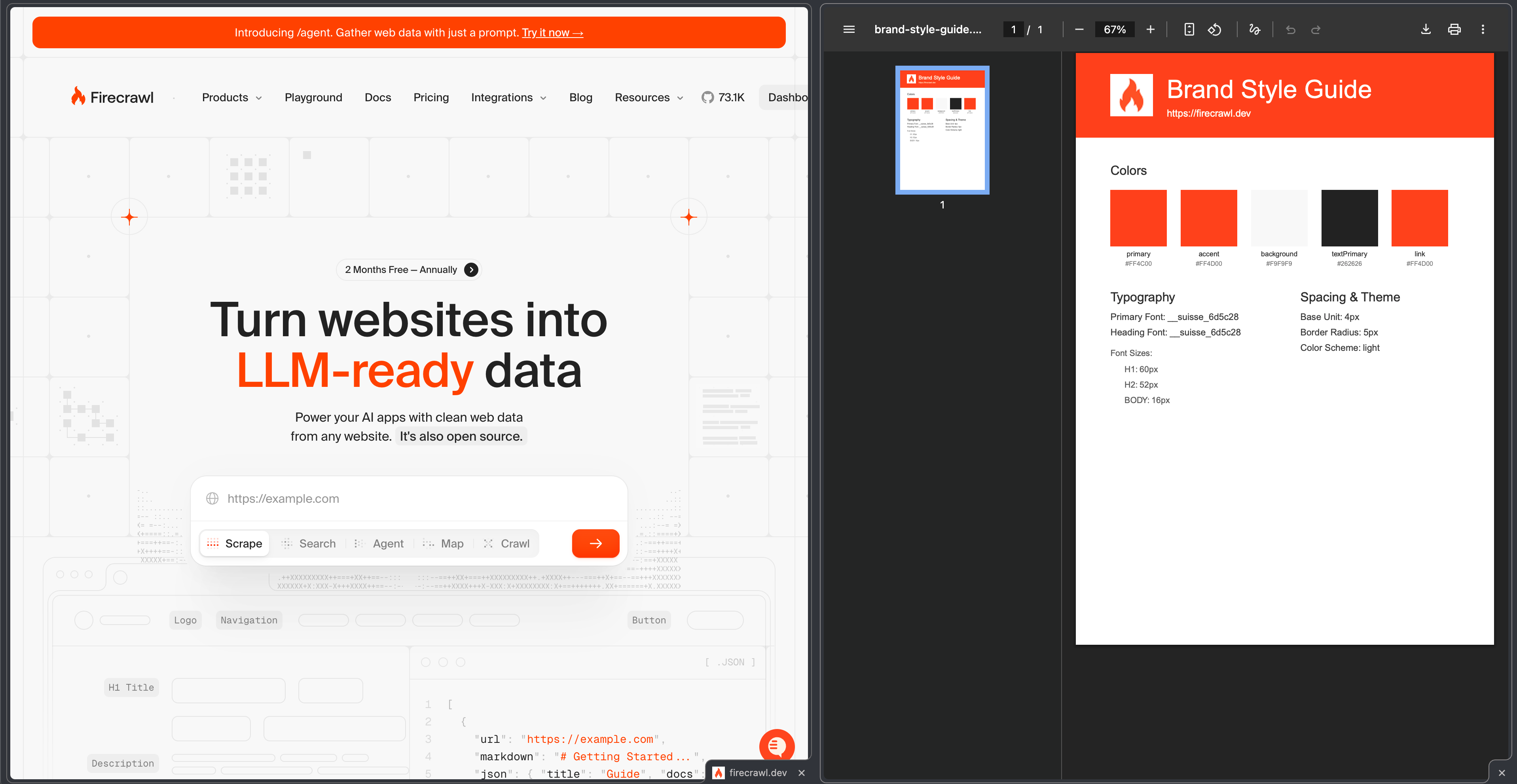
PDF には以下が含まれます:
* ブランドカラーに合わせたヘッダー
* 利用可能な場合のロゴの埋め込み
* 明確な階層構造を持つプロフェッショナルなレイアウト
* 生成日時を含むメタデータフッター
## カスタマイズのアイデア
### コンポーネント用ドキュメントを追加する
ジェネレーターを拡張して、UI コンポーネントのスタイルも含めるようにします:
```typescript theme={null}
// Spacing & Theme セクションの後に追加
if (b.components) {
doc.addPage();
doc.fontSize(20).fillColor("#333").text("UI Components", 50, 50);
// ボタンスタイルをドキュメント化
if (b.components.buttonPrimary) {
const btn = b.components.buttonPrimary;
doc.fontSize(14).text("Primary Button", 50, 90);
doc.rect(50, 110, 120, 40).fill(btn.background);
doc.fontSize(12).fillColor(btn.textColor).text("Button", 50, 120, { width: 120, align: "center" });
}
}
```
### 複数フォーマットでエクスポート
PDFに加えて、JSON形式でのエクスポートも追加します:
```typescript theme={null}
// doc.end() の前に追加
fs.writeFileSync("brand-data.json", JSON.stringify(b, null, 2));
```
### バッチ処理
複数のウェブサイト用のガイドを生成します:
```typescript theme={null}
const websites = [
"https://stripe.com",
"https://linear.app",
"https://vercel.com"
];
for (const site of websites) {
const { branding } = await fc.scrape(site, { formats: ["branding"] }) as any;
// 各サイトのPDFを生成...
}
```
### カスタム PDF テーマ
抽出したテーマに基づいて、異なる PDF スタイルを作成します。
```typescript theme={null}
const isDarkMode = b.colorScheme === "dark";
const headerBg = isDarkMode ? b.colors?.background : b.colors?.primary;
const textColor = isDarkMode ? "#fff" : "#333";
```
## ベストプラクティス
1. **欠損データの扱い**: すべてのウェブサイトが完全なブランディング情報を公開しているとは限りません。欠損しているプロパティには必ずフォールバック値を用意してください。
2. **レート制限の順守**: 複数サイトをバッチ処理する場合は、リクエスト間に遅延を挟み、Firecrawl のレート制限を順守してください。
3. **結果のキャッシュ**: 同じサイトに対する API コールを繰り返さないよう、抽出したブランディングデータを保存してください。
4. **画像フォーマットの扱い**: 一部のロゴは PDFKit がサポートしていないフォーマット(SVG など)である場合があります。フォーマット変換や、適切なフォールバック処理の追加を検討してください。
5. **エラーハンドリング**: 生成処理は try-catch ブロックで囲み、わかりやすいエラーメッセージを提供してください。
***
## 関連リソース
ブランディングフォーマットと、抽出可能なすべてのプロパティについて詳しく確認できます。
すべてのフォーマットオプションを含む scrape エンドポイントの完全な API リファレンスです。
PDFKit を使った高度な PDF カスタマイズオプションについて詳しく確認できます。
バッチスクレイピングで複数の URL を効率的に処理できます。